
December 9, 2025
How to Prepare for Daylight Saving Time in WO Automation for Radio
Spring Forward
Are you ready to spring forward? The following steps will automate your transition from Standard Time to Daylight Saving Time.
- Ensure all WO Automation for Radio computers have their operating systems configured for the correct Time Zone.
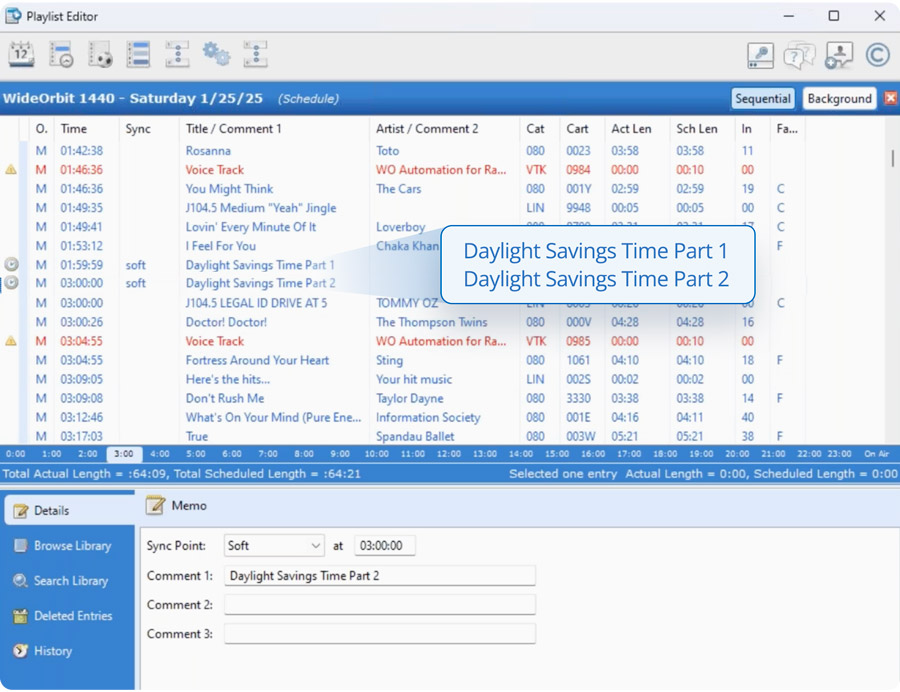
- Ensure the playlist for the day of the time change adheres to all the following rules:
- A soft synch at 01:59:59AM
- A soft synch at 03:00:00AM
- No content scheduled between the synchs, meaning nothing appears in the 2AM hour.
If any content appears in the 2AM hour, either because it was manually placed in that hour or because one or both synchs are missing, the Stack could stop during the time change.
Fall Back
To manage the time change from Daylight Saving back to Standard time, your 1:00 AM hour needs 120 minutes of content, scheduled to play before 02:00:00 AM, with all voice tracks and syncs removed between 01:00:00 AM and 02:00:00 AM. Your next sync may be scheduled at 02:01:00 AM, if that is your preference. Full instructions can be found here.
Watch the recording until the end for the bonus tip on how to prepare your pre-holiday Special Playlist.