December 11, 2025
Discover What’s New in WO Automation for Radio AFR2024
WO Automation for Radio’s version “AFR2024” is packed with customer-requested features, including:
- Enhanced timing accuracy
- New timing tools in Playlist Editor
- Gain values, column customization, and copy/move assets in Audio Finder
- Double Start & Vocal Protect improvements
- DTS AutoStage integration
- Live Copy on Hot Keys
- New wildcard and gain options in Automatic Media Asset Importer
- And more!
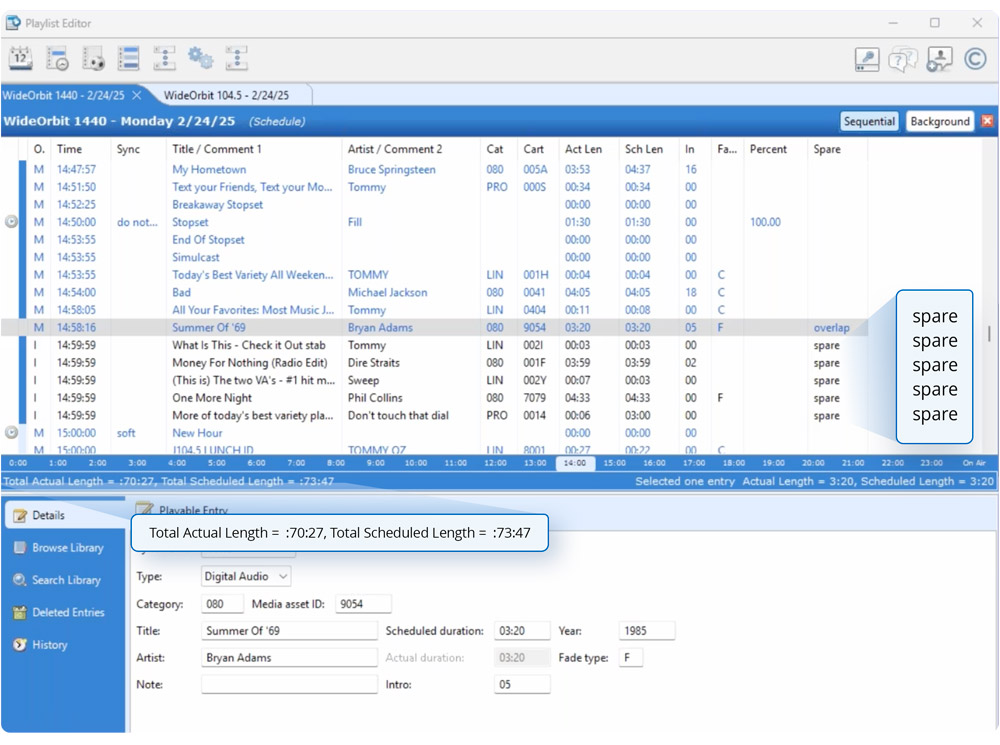
A new feature in the Playlist Editor is the option to add the “spare” column to your playlist display. This column will display “Overlap” to indicate the media asset will be on-air when the next synch is processed by the Stack widget. “Spare” indicates the media asset will never be played by the Stack Widget because of the next synch.
To activate this feature after you upgrade to AFR2024:
- Open a playlist
- Right click in the log
- Select “Customize table…”
- Select “Spare Type” and press the Add button
- Select “OK”